Introduction
AI-Powered Notion Workspace systems are changing the way modern content creators work, as digital clutter is often the ultimate productivity killer. Managing ideas, tracking production pipelines, scripting, and archiving published assets across separate, fragmented apps often leads to creative burnout. Content creators do not just need a digital notebook; they need a unified, intelligent command center.
This is where Notion steps in. When properly structured, Notion transforms from a simple note-taking tool into an advanced, automated workplace ecosystem. By integration of smart layout frameworks with embedded AI capabilities, creators can seamlessly transition from a raw brainstorm to a fully realized multi-platform content campaign. In this comprehensive guide, we will break down the step-by-step blueprint to building a high-performance, AI-driven Notion workspace tailored specifically for solopreneurs and digital asset creators.
Step 1: Architecting the Master Content Database
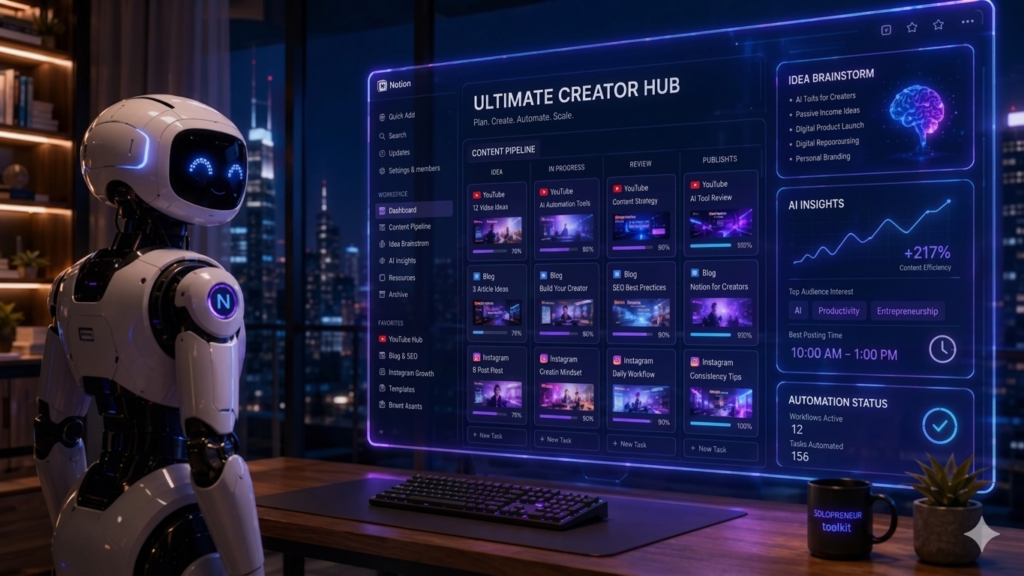
The core foundation of an elite Notion workspace is a single, centralized database rather than scattered, separate pages. By building a unified “Master Content Pipeline,” you can visualize your entire brand’s ecosystem at a single glance using multiple custom database views.
Start by creating a master database table and adding essential property tags. These should include Status (e.g., Idea, Scripting, In Production, Editing, Scheduled, Published), Platform (e.g., YouTube, Blog, Instagram, Newsletter), Publish Date, and Content Tier. Once your data fields are set up, leverage Notion’s powerful viewing options. Create a Kanban Board View grouped by Status to visually drag-and-drop your projects through your production stages, and a Calendar View filtered by your Publish Date to serve as your automated editorial calendar. This eliminates administrative friction, allowing you to instantly see what needs your attention next.
Step 2: Supercharging Your Workflow with Notion AI
With your master database structure firmly in place, the true automation magic happens when you infuse it with Notion AI. Instead of using artificial intelligence in a separate browser tab and constantly copying text back and forth, you can trigger advanced content generation directly inside your workspace pages.
By embedding Notion AI custom blocks into your standardized content templates, you can automate repetitive writing tasks with a single click. For instance, you can set up automated AI prompts within your YouTube or blog post templates to instantly analyze your raw research notes, generate ten high-click-through-rate (CTR) title variations, and automatically format a clean, search-optimized description box or introduction. Furthermore, you can use the AI data-fill properties in your main table to automatically summarize long scripts or extract action items without even opening the page.
Step 3: Streamlining with Standard Operating Templates
The final pillar of a high-yielding workspace is eliminating the “blank page anxiety” by deploying standardized templates. Instead of building a structure from scratch for every single piece of content, you can create pre-made layouts for your blog posts, newsletters, or social media scripts.
Inside these templates, combine your production checklists with pre-configured Notion AI prompt blocks. For example, your Newsletter Template can include a checklist for proofreading, a block for your core message, and an automated AI button configured to: “Analyze the text above and generate an engaging, subject-line variation with high open-rate potential.” This ensures that every time you start a new project, your formatting, your quality control, and your AI assistant are ready to go with a single click.
Conclusion
Building an AI-powered Notion workspace is the single best investment a digital solopreneur can make to protect their creative energy. By centralizing your database, embedding contextual AI prompts, and leveraging standard operating templates, you transform a simple productivity app into a fully automated content engine. Stop fighting digital clutter and start letting your workspace work for you.
By following this guide, you can successfully build your own AI-Powered Notion Workspace and scale your content production.
🚀 See it in Action!
Ready to supercharge your content creation pipeline without building it all from scratch? We’ve already done the heavy lifting for you. Click the button below to duplicate our premium, fully optimized Ultimate AI Creator Hub Notion Template and launch your automated workstation in less than 60 seconds!